See it
The product
看看
产品界面
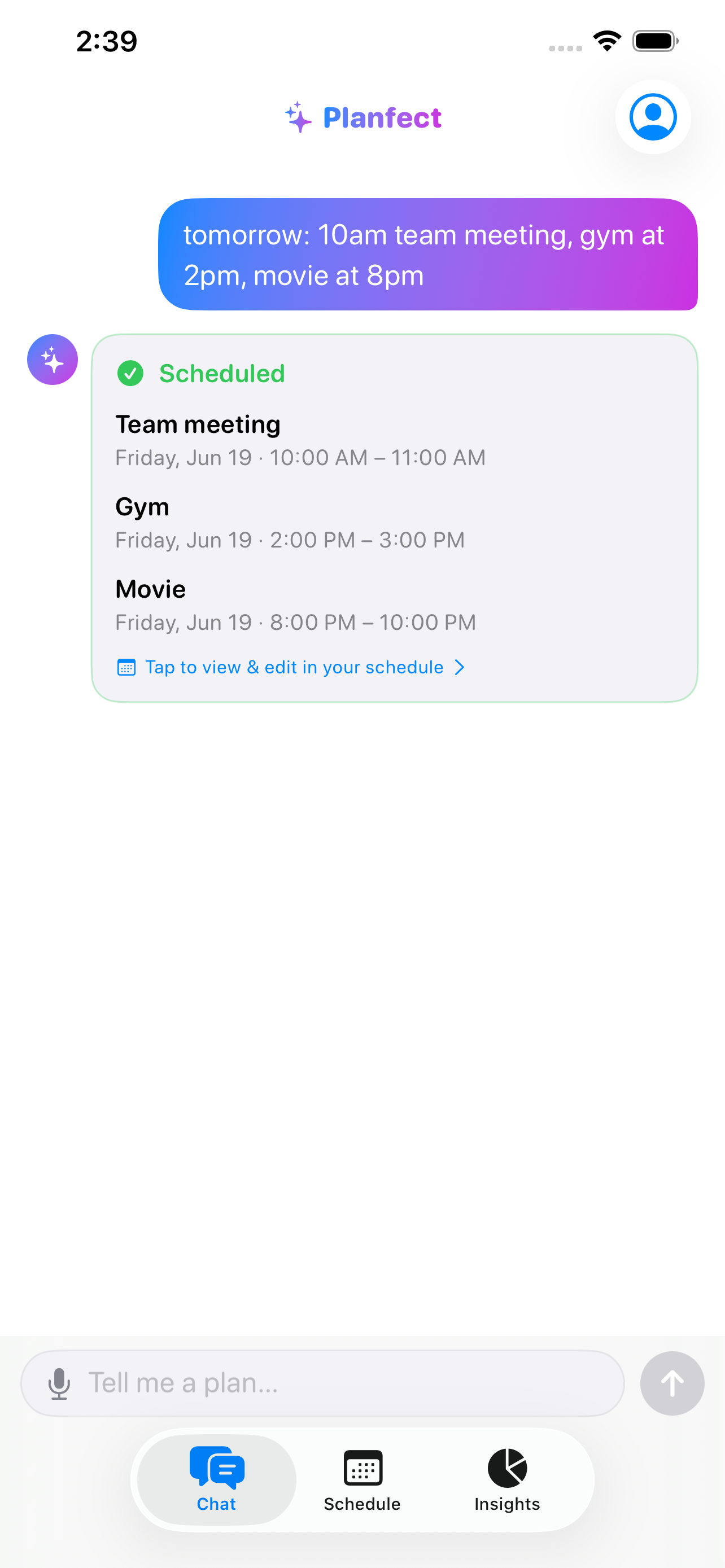
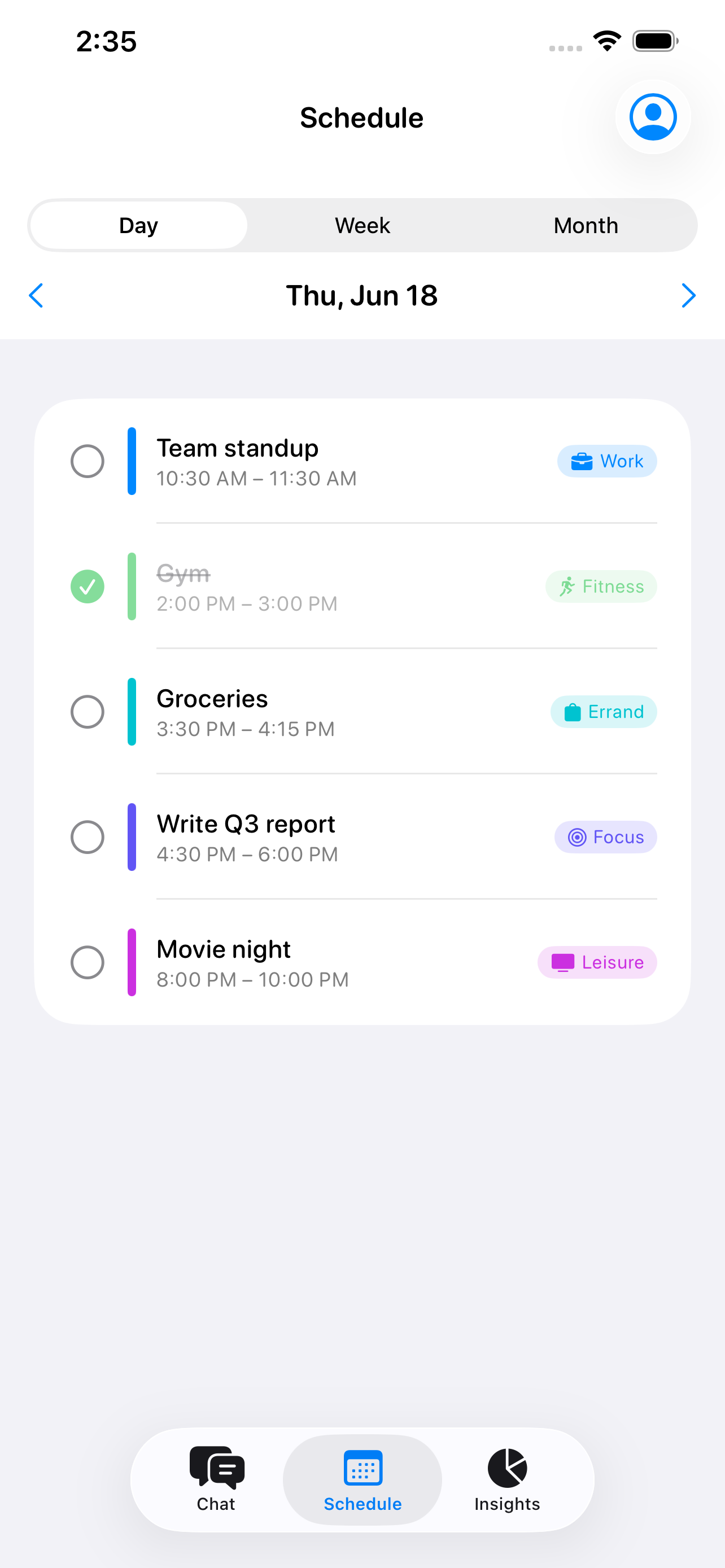
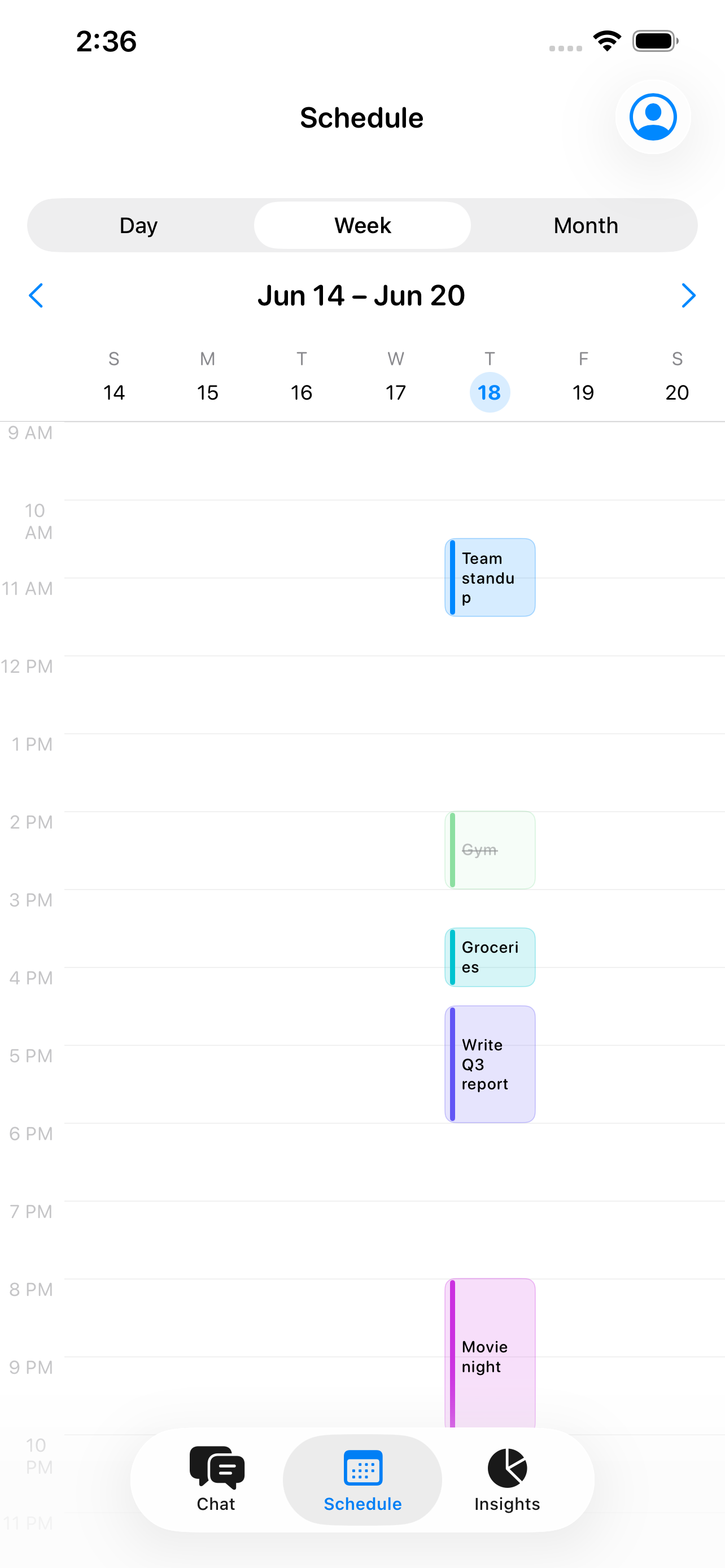
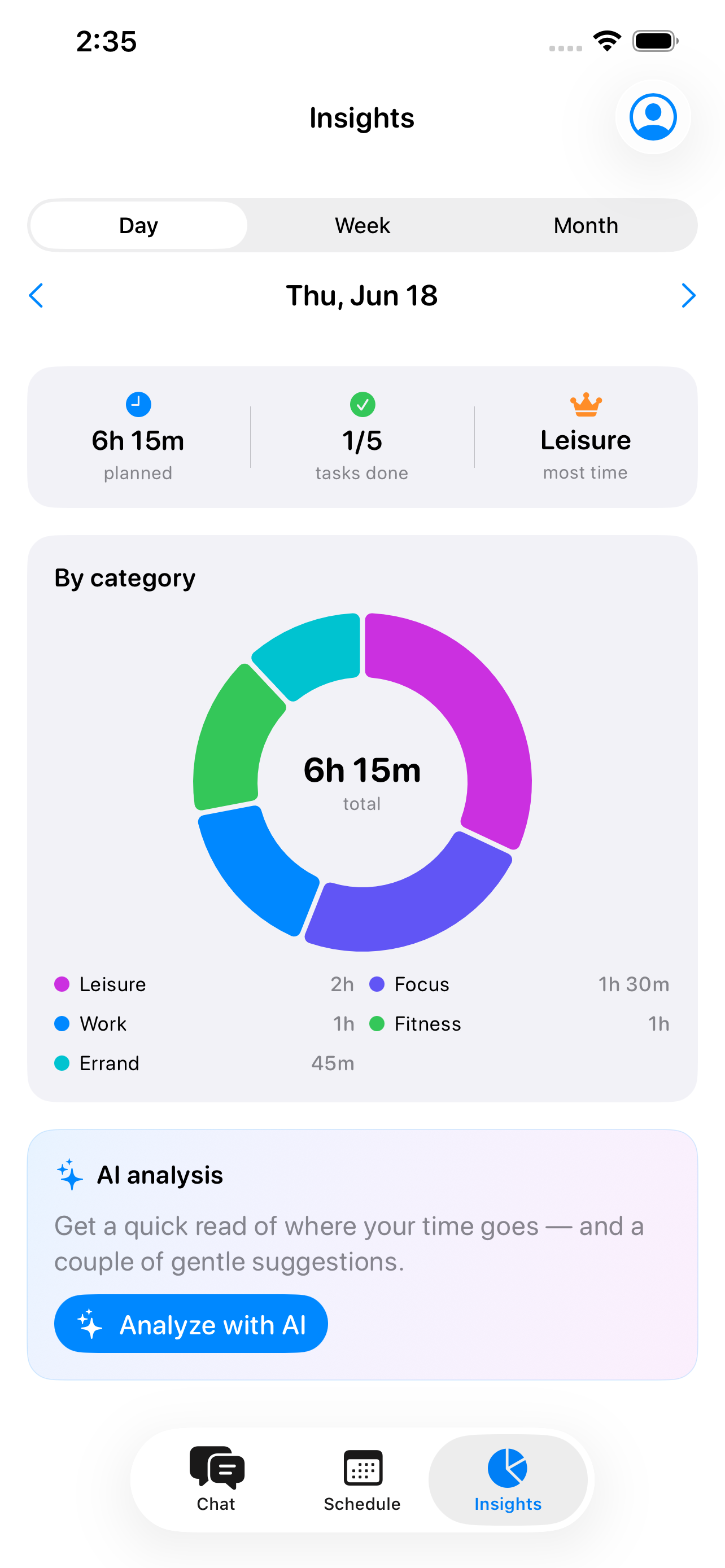
Tell it your plans by text or voice — “dentist Friday afternoon, groceries this weekend, finish the report this week” — and it builds your day around your routine, commute, and habits. Designed, built, and shipped end-to-end. 用打字或语音说出你的计划——「周五下午看牙、周末买菜、这周写完报告」——它就按你的作息、通勤和习惯把这一天排好。从设计、开发到上架,端到端打造。
Every to-do app hands you an empty grid and makes you figure out when to do everything, drag blocks around, and remember to leave on time. People don't think in calendars — they think in quick fragments: a thought on the walk, a reminder fired off mid-meeting.
Planfect's bet: you should be able to say one casual sentence — even a whole afternoon at once, by voice — and get a realistic, scheduled day back in seconds. The app does the when: it fits things around your work and sleep, adds real travel time so you arrive on time, learns your habits, and only asks when it's genuinely unsure.
每个待办 app 都丢给你一个空白格子,让你自己想什么时候做、拖来拖去、还得记着几点出门。可人不是按日历思考的——人是冒出碎片想法:走路时想起一件事、开会间隙顺手记一笔。
Planfect 的核心赌注:你只要随口说一句——甚至语音一口气说一下午的安排——几秒钟就能换回排好的一天。"什么时候做"交给 app:它绕开你的工作和睡觉时间、算上真实路程让你准点到、学你的习惯,只有真的拿不准才问你一句。
Fire off a quick thought — or a brain-dump of the whole day — and get it all scheduled in one shot.
Places each task in its natural time-of-day window, around your routine, sleep, and real calendar — never just the next open gap.
Looks up live commute time via Google Maps and schedules it before the task, so a 2:00 appointment means leaving at the right minute.
Sets up repeating habits and quietly learns your preferences (“workouts in the morning”) to apply to every plan.
Day / week / month timetable, charts of where your time goes with an AI read, plus “time to head out” nudges.
Home- & lock-screen widgets, Apple Calendar two-way sync, Sign in with Apple, data export — fully bilingual.
Add friends by @username and grade each Regular or Close. Close friends see your specifics and can plan with you; everyone else just sees that you're busy — blurred server-side by tier, never hidden only on the client.
丢一句话进去,或者语音把一整天的事一口气说完,一次性全排好。
把每件事放进它"自然该做"的时段,绕开作息、睡眠和真实日历——绝不只是塞进下一个空档。
用 Google Maps 查实时路程,并把通勤排在任务之前——两点的约会会让你提前出门、准点到。
设置重复性习惯,并悄悄记住你的偏好(「健身放早上」),应用到之后每一次安排。
日/周/月时间表、时间去向图表 + AI 解读,还有"该出发了"的贴心提醒。
桌面/锁屏小组件、Apple 日历双向同步、Apple 登录、数据导出——完整中英双语。
用 @用户名 加好友,分「普通好友」和「密友」。密友能看到你的具体安排、还能跟你一起排;其他人只看到你忙不忙——可见粒度在服务端按等级模糊,绝不只靠客户端藏。
This runs the same AI the app uses: it really looks up event times on the web, computes real travel times, and schedules in your timezone. Type a plan or tap an example. Nothing is saved and no account is needed.
这里跑的就是 app 里那个 AI:会真的联网查活动时间、算真实通勤、按你所在时区来排。打一句安排或点个例子试试。不保存任何数据,也不用登录。
Real answers, live — but the demo writes to no calendar and saves nothing.回答是真实、实时的——但 demo 不会写入任何日历,也不保存任何东西。
A native iOS client, a serverless TypeScript backend, and an LLM agent that doesn't just chat — it reasons about your schedule, calls tools, and commits real database writes.
一个原生 iOS 客户端、一个 Serverless 的 TypeScript 后端,加上一个会"干活"的 LLM agent——它不只是聊天,而是真的推理你的日程、调用工具、并写进数据库。
Chat UI w/ markdown, day/week/month timetable, Swift Charts insights, WidgetKit (App Groups), EventKit, Speech, Sign in with Apple, notifications.
Postgres + RLS, four Edge Functions in Deno/TypeScript, auth, ordered migrations, security-definer RPCs for cross-user reads. A timezone-aware scheduling engine (pure, 50 unit tests) places tasks into free slots.
Multi-step tool-calling: reads context, proposes, confirms, then writes. Provider and model are swapped at runtime from the dashboard — OpenAI, Kimi, or MiniMax behind one adapter — with per-turn latency, token usage and cost logged for each.
带 Markdown 的聊天界面、日/周/月时间表、Swift Charts 分析图、WidgetKit 小组件(App Groups)、EventKit、语音识别、Apple 登录、本地通知。
Postgres + 行级安全(RLS)、四个 Deno/TypeScript 的 Edge Function、鉴权、有序迁移,跨用户读取走 security-definer RPC。一个时区感知的排程引擎(纯函数、50 个单元测试)把任务放进空闲时段。
多步工具调用:读上下文 → 提议 → 确认 → 写库。服务商与模型可在后台运行时切换——OpenAI / Kimi / MiniMax 共用一套适配层——每一轮的延迟、token 用量和成本都分别记录。
The planner schedules in the user's local time, and looks up cross-timezone events (a London match watched from the US) and converts to their clock. Fixed a class of bugs where “today” drifted to a past date in long, multi-day chats — by stamping the authoritative date onto the latest turn for recency.
Commute is scheduled before a pinned task (you leave early, arrive on time — not the activity pushed later). A voice brain-dump of several tasks is planned in one batch; genuine conflicts are surfaced, never silently mis-scheduled. When a detail is still undecided — which restaurant, exactly where — it blocks a tentative hold you can refine in a tap, instead of interrogating you or scheduling nothing.
Cut planner latency ~60% by short-circuiting a redundant LLM round-trip once tasks land on the calendar, skipping needless schedule lookups (the calendar is already in context), and parsing dates once at decode.
The planner's behaviour is a 3,000-word system prompt — the kind of thing normally tuned by vibes. Instead there's an eval harness that drives the real agent loop over a fixed scenario suite against a pinned clock and scores each result programmatically, so every prompt edit reports a pass rate. It caught regressions vibes would have missed and turned tuning into a number: 20/26 → 26/26 on the live model.
RLS-secured data, App Groups for the widget, distribution signing → TestFlight → App Store pipeline (automated via API key), a password-gated analytics dashboard, CI, and prompt-level content guardrails.
Plans sync into a dedicated “Planfect” calendar, reconciled — create / move / delete — against a planfect://block/<id> marker stamped on each event. Edits and deletions in the app flow to Apple Calendar, while your personal events are never read or modified; the planner also excludes its own calendar when reading “busy,” so it never plans around itself.
Flipping 中文 ⇄ EN in Settings re-skins the whole app immediately — no relaunch. A Bundle.main reclass redirects every localized lookup to the chosen .lproj at runtime, and the view tree re-renders keyed on the language while the one-time startup work stays put.
A friend's calendar is readable only through a security-definer RPC that checks the friendship + tier and blurs before returning — regular friends get busy/free, close friends get specifics, any plan can be Private. The owner's own RLS still hides every row, so no un-permitted detail leaves the database. Saying “dinner with @friend” double-books both calendars via a shared id (permissioned to close friends), and friend/collab events fire an APNs push signed with an ES256 provider JWT.
排程一律按用户本地时间;查跨时区赛事(在美国看伦敦的比赛)会自动换算成你的钟点。还修掉了一类 bug:跨好几天的长对话里"今天"会漂到过去的日期——办法是把权威日期戳到最新一条消息上,靠"就近"压住旧日期。
通勤排在定点任务之前(你提前出门、准点到,而不是把活动往后推)。语音一口气报好几件事会被一次性批量排好;真正的冲突会提示你,绝不偷偷排错。细节还没定(哪家店、具体在哪)时,会先占一个临时位,之后一点就能改,而不是反问你或干脆什么都不排。
排程延迟降了约 60%:任务一落到日历就短路掉一次多余的 LLM 来回、省掉没必要的日程查询(日历本来就在上下文里)、日期只在解码时解析一次。
规划器的行为由一份三千词的系统提示词决定——这种东西通常只能凭感觉调。这里有一套 eval:用固定时钟、固定场景集去跑真实的 agent 循环,再按程序逐条判分,于是每次改提示词都能报出一个通过率。它抓到过纯靠感觉必然漏掉的回归,也把调优变成了一个数字:线上模型 20/26 → 26/26。
RLS 保护的数据、小组件用的 App Groups、发布签名 → TestFlight → App Store 全流程(用 API key 自动化)、带密码保护的分析后台、CI、以及提示词层面的内容护栏。
计划会同步进一本专属的「Planfect」日历,按写在每个事件上的 planfect://block/<id> 标记做对账——新建 / 移动 / 删除。你在 app 里改或删,都会同步到 Apple 日历,而你自己的私人事件从不被读取或改动;规划器读「忙碌」时也会排除自己这本日历,绝不围着自己排程。
在设置里 中文 ⇄ EN 一切,整个 app 立刻换皮、不用重启。靠把 Bundle.main 重新归类、运行时把每次本地化查找重定向到选定的 .lproj,再让视图树按语言重渲染,而一次性的启动逻辑原地不动。
好友日历只能经一个 security-definer 的 RPC 读取——它先校验好友关系 + 等级,返回前就模糊好:普通好友拿到忙/闲,密友拿到具体,任意日程可设私密。owner 自己的 RLS 仍挡住每一行,没有授权的细节绝不离开数据库。说一句"和 @某人 一起吃饭"会用共享 id 双挂两人日历(限定密友),好友/协作事件还会发一条用 ES256 provider JWT 签发的 APNs 推送。
/plan loop — verified end-to-end against a live database before any UI./plan 循环——在写任何界面之前,就对着线上数据库端到端验证通过。